 Skip to content


How much does CMMC cost, and how long is it going to take my company to comply?
These are the two most frequently asked questions we receive. And they are fair questions. Unfortunately, there’s not much we can say in response other than, “it depends.” We can provide averages, but the truth is that there are many factors that will influence the cost and time requirements that come with becoming CMMC-ready. The good news, though, is that there is one factor that stands out among the rest, which will ultimately give you a clarity for your expected CMMC costs and timeline: your assessment scope.
In preparing for your CMMC Level 2 self- or third-party assessment, scoping is an essential step in the compliance process. Doing so during the beginning of your CMMC journey will likely save you both time and money in the long-run. So, in this post, we explore in detail the process of scoping, and how you can get started with creating your CMMC Level 2 scope today.
You can navigate to each section of interest via the menu below.
Getting started with CMMC Level 2 scoping
The chief authoritative document to be aware of when creating your CMMC Level 2 scope is the DoW’s CMMC Level 2 Scoping Guide. This is the source of truth for this topic and is a (surprisingly) easy read, at least for those who spend many hours a week churning through Federal Government documentation. This post will focus on the Level 2 Scoping Guide, but DoW also provides guides for CMMC Level 1 and Level 3.
As the Level 2 Scoping Guide outlines, a CMMC scope informs an Organization Seeking Assessment (OSA — those intending to perform a CMMC Level 2 Self-Assessment) or an Organization Seeking Certification (OSC — those intending to undergo a CMMC Level 2 C3PAO assessment) of their CMMC Level 2 “boundary”. The boundary defines all the assets (hardware, software, people, facilities, and external service providers) that must be assessed (and how). Scoping entails reviewing each asset against the five asset categories in the Level 2 Scoping Guide and assigning a category. We’ll unpack each asset category in the next section and elaborate on what you need to do for that asset category.
Of course, reviewing and assigning CMMC asset categories to your list of assets assumes you have a list of assets. If not, you’ll want to begin there, then return to scoping. Additionally, if you’ve not yet identified the specific CUI elements you are handling, you’ll also want to do that first.
We’ll also note that, if you are preparing for a CMMC Level 2 C3PAO assessment, once you’ve signed with a C3PAO, part of the “pre-assessment” process is agreeing on the scope. So, as you engage in this activity in anticipation of eventually participating in a C3PAO assessment, know that if you encounter unique challenges or questions with your scope, you can ask your C3PAO for their take on it before launching right into your assessment.
CUI Assets
CUI Assets are the first asset category listed in the Level 2 Scoping Guide and are the most burdensome in terms of implications for a CMMC assessment. Select the image below for the full summary of CUI Assets, including a description of what you must do with CUI Assets, what to expect during an assessment, and some examples. We then unpack this and provide further clarification and context for each item.
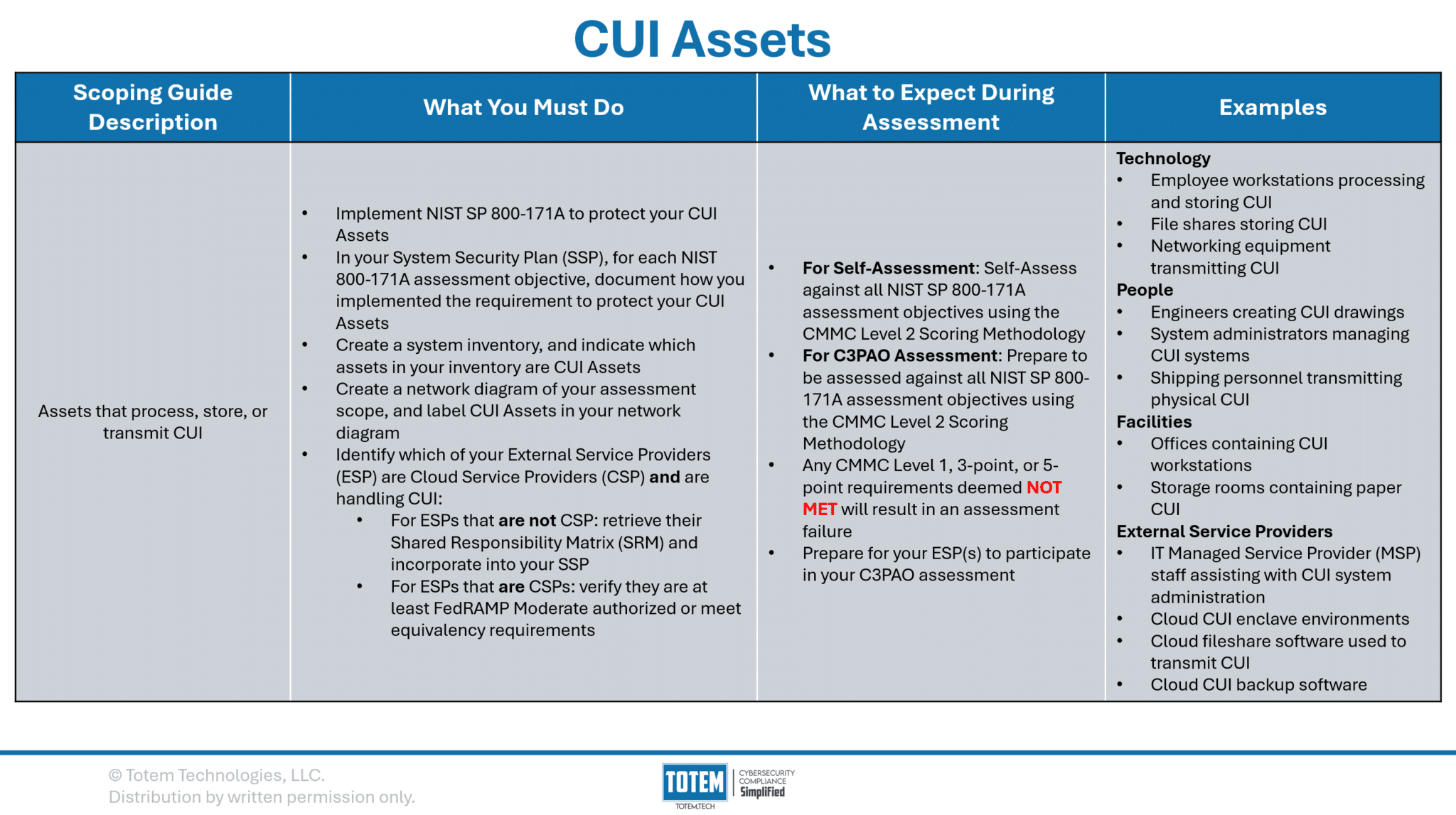
CUI Assets are those that process, store, or transmit CUI. If your organization handles CUI, it has CUI Assets within its scope. These assets are the most costly and time-consuming to protect, as they are subject to all of NIST SP 800-171A, and all assessment objectives must be implemented to protect those assets. Organizations need to be very careful about which assets they permit to handle CUI due to this fact (see control 3.1.3!).
Not only are you on the hook for implementing NIST SP 800-171A to protect your CUI Assets, but you’ll also need to include, in your System Security Plan (SSP), justification for how you have implemented each assessment objective to protect your CUI Assets. For each objective, this should include references to sources of compelling evidence (an artifact a CMMC assessor could examine, a stakeholder they could interview, or a process they could test). You’ll need to be prepared to provide this justification and evidence to a C3PAO, which they will review to determine if it is sufficient for meeting assessment objective.
A quick side note on how scoring works during a CMMC assessment. First thing to note: If your organization doesn’t have an SSP, there is nothing to score against, and so the first step is to create an SSP. Consider using Totem™ for building your SSP. Once you have an SSP, each control in NIST SP 800-171 has an associated “score” value. Some are worth one point, some three, and some five. Any deficient control (e.g., at least one assessment objective in that control is Not Met) results in the associated score value being subtracted from 110. Per the CMMC Final Rule, a score of 88/110 is the minimum threshold to “pass” a CMMC Level 2 assessment with a Conditional (not Final) certification. However, this comes with major caveats:
- No three-point, five-point, or 110-point controls may be deficient at the time of assessment.
- One exception to this exists with control 3.13.11, which requires FIPS-validated cryptography. This is a unique control in that it is considered a “variable” score (one of two, the other being 3.5.3); you lose five points if you have no encryption in place at all, or you lose only three points if you have encryption, but that encryption is not FIPS-validated. If you have no encryption, you will fail the entire assessment. If you have encryption but it’s not yet FIPS-validated, and you’ve accounted for this in your documentation, you’ll lose three points but can still pass the assessment.
- No one-point controls that are also CMMC Level 1 controls may be deficient at the time of assessment.
- In summary, only one-point controls that are not also CMMC Level 1 controls may be deficient at the time of assessment.
Next, within your system inventory, you’ll want to clearly label which assets are CUI Assets. If you don’t yet have a system inventory, consider utilizing the Totem™ Inventory module. Performing this step assumes you’ve already identified your assets and generated a list of these assets.
Next, you’ll need to create a couple diagrams: a network diagram and a data flow diagram. A network diagram depicts how the organization has set up its IT system, which should include technical information such as networking details (subnets, VLAN IDs, etc.) and interconnections (ports/protocols) between different network segments. A data flow diagram, similar to a network diagram, should provide a graphical depiction of how CUI flows throughout the organization. This diagram should identify which business units (e.g., engineering, quality, IT, etc.), internal boundaries (e.g., network segments, VLANs, etc.), and external boundaries (e.g., external service providers, suppliers, etc.) your CUI touches. Your data flow diagram is meant to easily communicate to your C3PAO which assets are CUI Assets, and which are not. Some organizations choose to overlay their data flow diagram on top of their network diagram as to only maintain one diagram, but that is up to you.
Next, you’ll need to figure out which of your External Service Providers (ESP — Managed Service Providers, Managed Security Service Providers, Cloud Service Providers, etc.) handle CUI. The CMMC Level 2 Scoping Guide provides the following definition of an ESP:
To be considered an ESP, data (specifically CUI or Security Protection Data, e.g., log data, configuration data) must reside on the ESP assets as set forth in 32 CFR § 170.19(c)(2).
CMMC L2 Scoping Guide Definition of ESP
Per the definition, to be considered a true ESP in the context of CMMC, the ESP needs to be handling CUI (or Security Protection Data — SPD — more on this later!) on its own systems. Such ESPs will need to get their own CMMC Level 2 assessment. However, the Scoping Guide goes on to indicate that there may be other instances where your service provider could still be “in scope” for your assessment, even if they are not handling CUI:
ESPs (...) that do NOT store, process, or transmit CUI, do not require their own CMMC assessment. Services provided by an ESP are in the OSA’s assessment scope.
CMMC L2 Scoping Guidance for ESPs
A little confusing, since the Scoping Guide just defined an ESP as an entity that handles CUI/SPD on its own assets. Regardless, we recommend that you compile a list of each service provider you utilize to a) handle CUI, b) protect CUI, and/or c) help you meet any of the 320 NIST 800-171A assessment objectives. Very common examples of ESPs are IT Managed Service Providers and Managed Security Service Providers. You’ll then want to request those providers’ Shared (Customer) Responsibility Matrix (SRM/CRM). This document, created by the ESP, should highlight which controls and assessment objectives their services fully or partially cover on your behalf, and any residual responsibilities that you, as the contractor, need to fulfill. You can then incorporate this into your SSP. Assessors will be looking for SRMs for any in-scope ESPs you use, as their job is to determine full coverage of all 320 assessment objectives, regardless of whether the coverage comes from you or your ESP(s). The assessors may request that your ESP(s) participate in your assessment, so preparing them for that possibility is encouraged.
If your ESP is also a Cloud Service Provider (CSP), there’s much more that they need to do. To be considered a true CSP, the provider must meet the following definition:
Cloud Service Provider (CSP) means an external company that provides cloud services based on cloud computing. Cloud computing is a model for enabling ubiquitous, convenient, on demand network access to a shared pool of configurable computing resources (e.g., networks, servers, storage, applications, and services) that can be rapidly provisioned and released with minimal management effort or service provider interaction. An ESP would be considered a CSP when it provides its own cloud services based on a model for enabling ubiquitous, convenient, on-demand network access to a shared pool of configurable computing that can be rapidly provisioned and released with minimal management effort or service provider interaction.
CMMC L2 Scoping Guide Definition of CSP
Microsoft, Google, and AWS are the most common examples of CSPs, but they are not the only ones. Any provider you utilize that meets the above definition of a CSP must meet the following:
ESPs that are CSPs, and store, process, or transmit CUI, must meet the FedRAMP requirements in DFARS clause 252.204-7012. ESPs that are CSPs and do NOT store, process, or transmit CUI, are not required to meet FedRAMP requirements in DFARS clause 252.204-7012. Services provided by an ESP are in the OSA’s assessment scope.
CMMC L2 Scoping Guidance for CSPs
The FedRAMP requirements in DFARS clause 252.204-7012 are that any CSP that handles CUI on its own systems must be at least FedRAMP Moderate authorized, or they must meet the FedRAMP Moderate authorization “equivalency” requirements. FedRAMP, while having many similarities to CMMC, is different from CMMC in that it was created for the Federal Government to evaluate CSPs before purchasing their wares.
Attaining FedRAMP Moderate is a very large undertaking, significantly greater than even CMMC Level 2, with hundreds of controls and thousands of assessments objectives. Additionally, transitioning from FedRAMP “ready” to “authorized” requires the CSP to secure sponsorship from a Federal entity, which can be very challenging. Thankfully, the DoW did not limit its industrial base to only truly authorized CSPs, as they permit use of CSPs that have achieved FedRAMP Moderate “equivalency”. Achieving equivalency entails that the CSP implements all the same requirements in FedRAMP Moderate, fully pass a 3PAO assessment, and provide a Body of Evidence (BoE) demonstrating full compliance upon request. If you were ever wondering why cloud CMMC solutions offered by CSPs (e.g., fully cloud enclaves) are as expensive as they are… FedRAMP is one of the reasons!
So, what does this mean for you as the contractor? Well, if you utilize any CSPs to handle your CUI, you’ll need to ensure that your CSP is FedRAMP Moderate authorized or that they meet the equivalency requirements defined in this memo. If you identify any CUI-handling CSPs as in-scope, your CMMC assessors will be looking for evidence that they meet these FedRAMP requirements.
This is a comprehensive summary of what you must do with CUI Assets and what to expect during an assessment. As you’ve likely already concluded, there is a LOT to consider and work through. Let us know if we can help. If there’s a single takeaway from all this… be very careful where you are flowing CUI!
Security Protection Assets
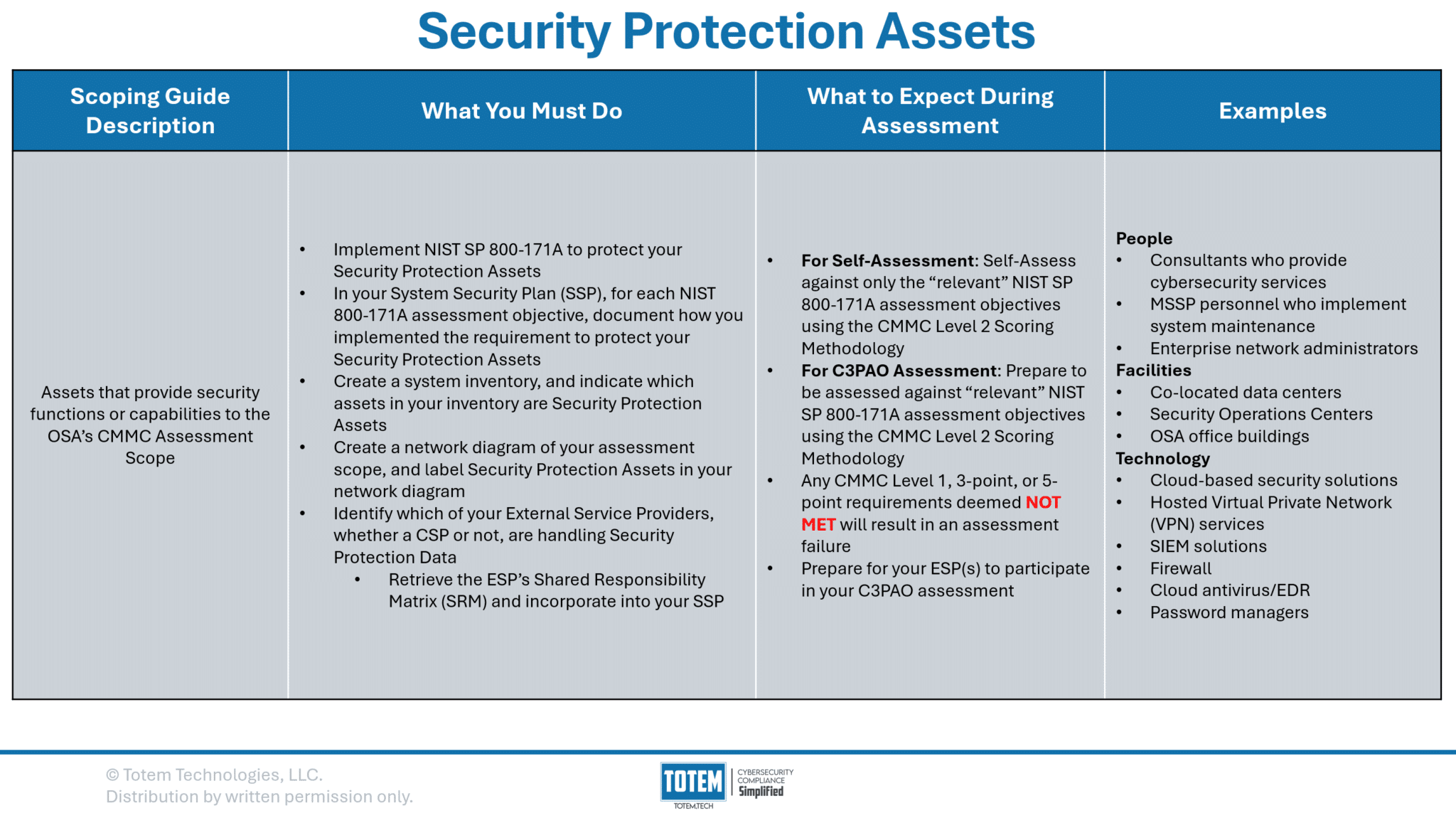
Security Protection Assets (SPA) are the second asset category found in the CMMC Level 2 Scoping Guide. While not quite as burdensome as protecting CUI Assets, SPA introduces what we would consider to be the single biggest grey area in all of CMMC: the inclusion of the term “relevant,” and what this really means. Per the Scoping Guide, an SPA is an asset that provides security functions or capabilities to your CMMC scope. SPAs are included in your CMMC assessment scope given that they inevitably will protect CUI Assets and therefore will need their own safeguarding.
SPAs by definition handle Security Protection Data (SPD). Think of items such as log data, network traffic, firewall rules, passwords… while none of these are CUI, in the event that any were compromised, it could have significant impacts on the targeted organization and perhaps the DoW mission. Therefore, SPAs need to be protected.
Well, how must SPAs be protected? Per the Scoping Guide, OSAs are directed to “prepare to have their SPAs assessed against the CMMC Level 2 requirements.” That sounds like all 320 NIST 800-171A assessment objectives must be implemented upon SPAs (they do). However, the Scoping Guide also states that CMMC Assessors should only assess against the CMMC Level 2 requirements “relevant to the capabilities provided.” How is relevancy of a requirement towards an SPA determined? Unfortunately, there is no clear answer, and it is up to the CMMC assessors to make this interpretation. Some may assess you against all 320 assessment objectives; some may be much more selective of which requirements they assess against. You’ll need to be sure you know what your C3PAO is expecting.
Aside from implementing the security requirements to protect SPAs, you’ll need to also do the following tasks, same as you did for CUI Assets:
- Include, in your System Security Plan (SSP), justification for how you have implemented each assessment objective to protect your Security Protection Assets. For each objective, this should include references to sources of compelling evidence. Compared to CUI Assets, the key difference here is that the CMMC assessors may not assess your SPAs against all 320 assessment objectives. It will depend on their interpretation of “relevant.”
- Clearly label within your system inventory which assets are Security Protection Assets.
- Clearly identify within your network diagram/data flow diagram which assets are Security Protection Assets.
- Identify which of your ESPs handle SPD on their own assets, retrieve their SRM and incorporate into your SSP, and prepare them to participate in your CMMC assessment. ESPs that are handling SPD do not need to go through the FedRAMP authorization process, nor are they required to get their own CMMC assessment.
Contractor Risk-Managed Assets
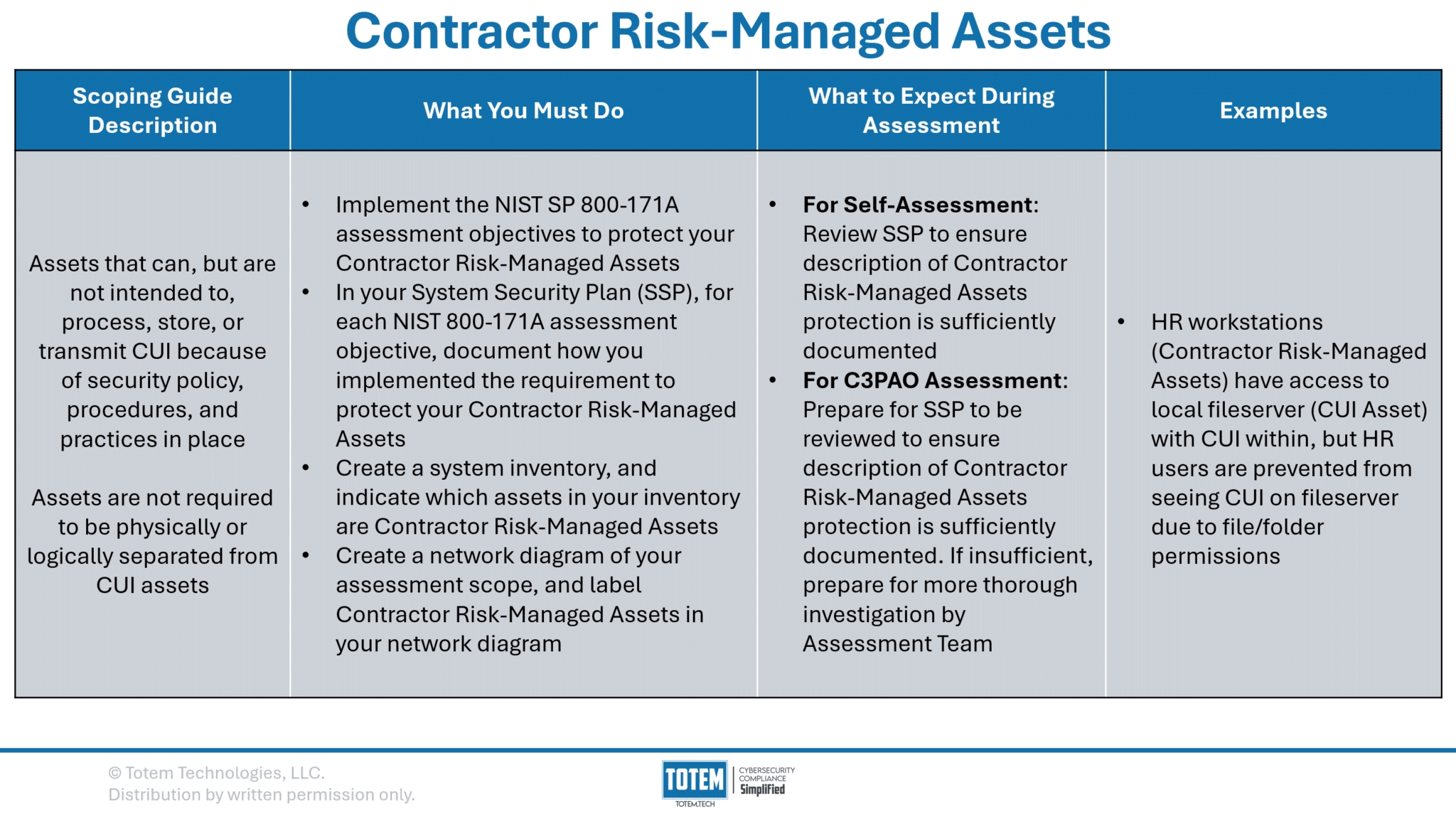
Contractor Risk-Managed Assets (CRMA) are those that could handle CUI, but they’re not intended to. These assets have not been physically isolated (e.g., airgapping) or logically isolated (e.g., VLANing) from your CUI Assets, or else they would be considered Out of Scope Assets. If you are considering designating an asset as a CRMA, the question you should be asking is: can this be physically or logically isolated from my CUI Assets?
Consider an example where you are a small manufacturer that has a local fileserver with CUI stored on it, making it a CUI Asset. Your HR and Finance users all can access the fileserver, but they cannot access any folders containing CUI due to file/folder permissions. While these users cannot access the CUI, file/folder permissions are not enough to be considered logical isolation. Therefore, the HR and Finance workstations are considered CRMA.
The crux of the matter is that, for CRMA, you will need to describe in detail the risk mitigations you put in place to ensure CUI does not touch the CRMA. Otherwise, you still need to implement all 320 assessment objectives to protect your CRMA. Which begs the question again: is there opportunity to physically or logically isolate the CRMA from the CUI Assets? If so, this would make those assets Out of Scope rather than CRMA, and you would no longer need to implement all 320 assessment objectives. In this example, the manufacturer may set up another fileserver on a separate subnet or network entirely, exclusively for CUI, and limit access to it only to the users who need to access CUI. This would be an example of logical or physical isolation, which would make the HR/Finance fileserver and their workstations Out of Scope and not need to implement the requirements upon those assets.
If you need CRMAs in your environment, you’ll follow the same battle rhythm as you have for other asset types:
- Include, in your System Security Plan (SSP), justification for how you have implemented each assessment objective to protect your CRMAs. For each objective, this should include references to sources of compelling evidence. Note that CMMC assessors are instructed just to review your SSP to ensure you’ve adequately documented protection of CRMAs. If your documentation is insufficient, they will perform a more thorough investigation into whether or not you are adequately protecting your CRMAs.
- Clearly label within your system inventory which assets are CRMAs.
- Clearly identify within your network diagram/data flow diagram which assets are CRMAs.
Specialized Assets
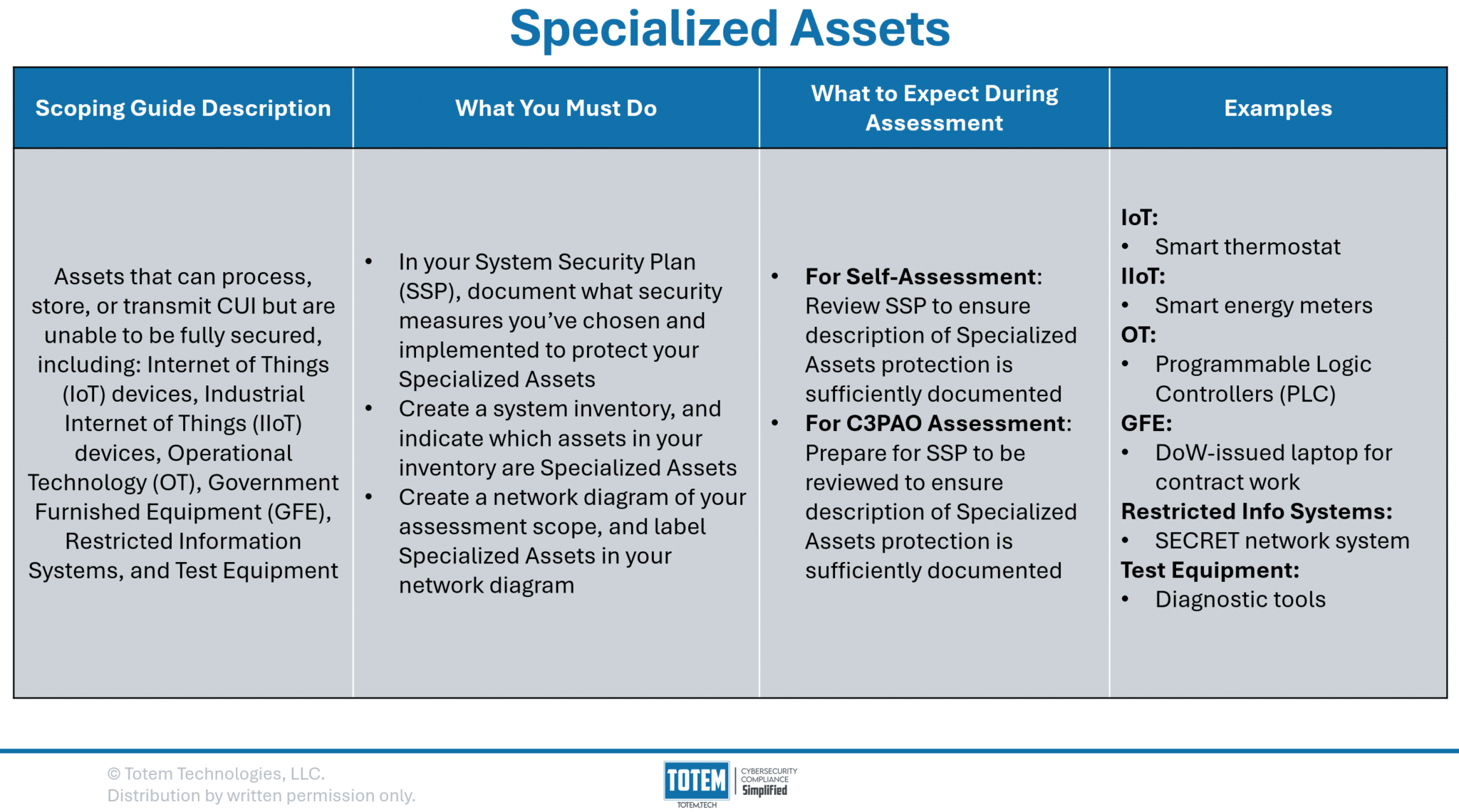
Specialized Assets are those that also could handle CUI but can’t be fully secured, for…reasons. For example, say there is a device that is critical to your Federal government business process but for whatever reason multifactor authentication cannot be configured on the device. The CMMC Scoping Guide provides some example of these, including Internet of Things (IoT) devices, Industrial IoT (IIoT), Operational Technology (OT), Government Furnished Equipment (GFE), Restricted Information Systems, and Test Equipment.
Specialized Assets are especially prevalent in manufacturing environments, where OT and test equipment are common in the handling of CUI. Imagine if you were required to always apply the latest patches or implement complicated security baselines to your manufacturing equipment. It would likely break and cease production! This is why Specialized Assets exist in the context of CMMC.
If you have Specialized Assets, you’ll continue with a similar battle rhythm as other asset types:
- Include, in your System Security Plan (SSP), justification for how you have chosen to protect your Specialized Assets using your own methods. For example, you have security cameras that monitor use of your shop floor, which would detect any nefarious use of your OT. Note that CMMC assessors are instructed just to review your SSP to ensure you’ve adequately documented protection of Specialized Assets. They will not assess these assets against the 320 assessment objectives.
- Clearly label within your system inventory which assets are Specialized Assets.
- Clearly identify within your network diagram/data flow diagram which assets are Specialized Assets.
Out-of-Scope Assets
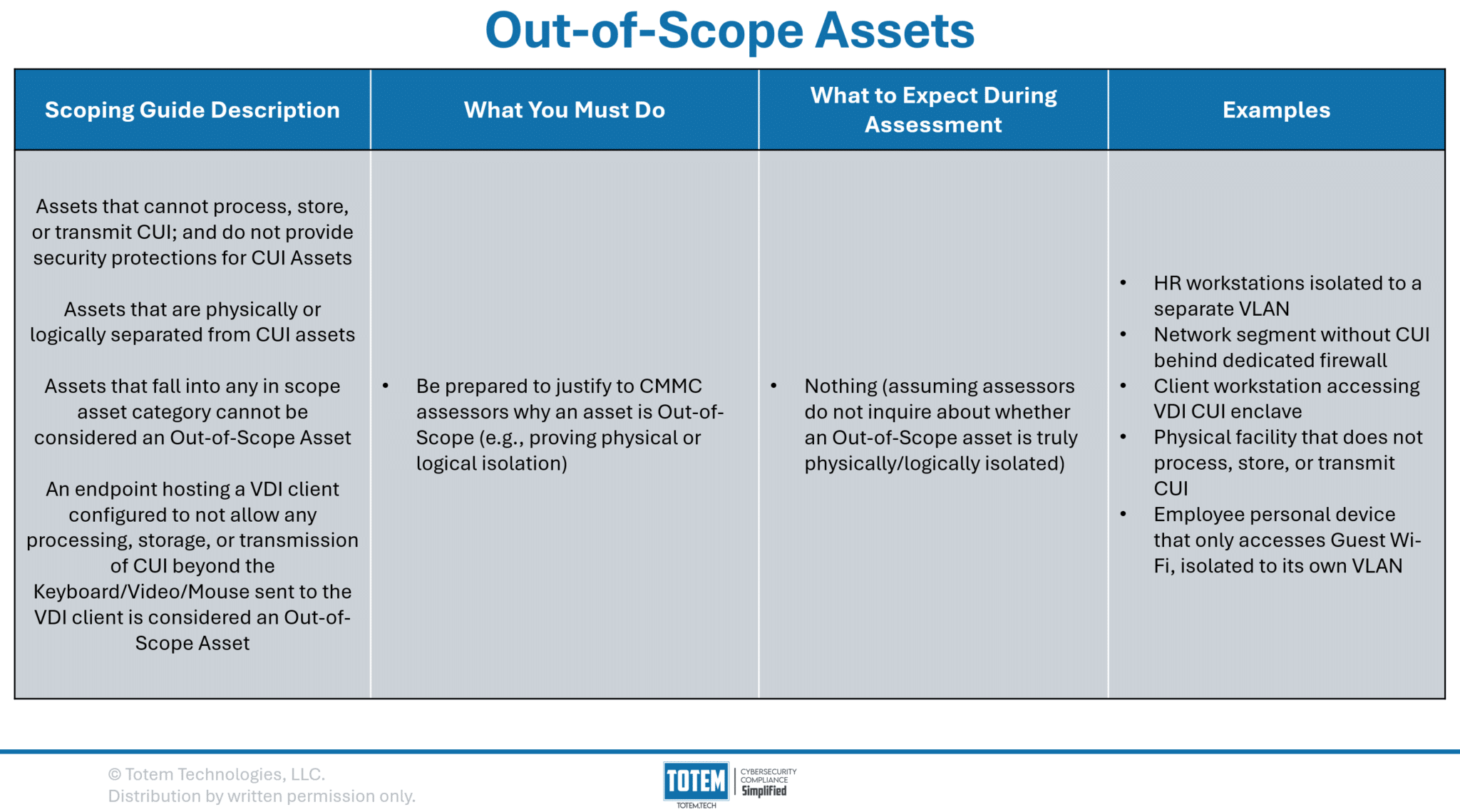
At long last, we arrive at the final asset type: Out-of-Scope Assets. The four previous asset categories are each considered “in-scope,” meaning assessors will evaluate the security protections of those assets. By definition, Out-of-Scope Assets will not be assessed by your assessment team, unless the assessors are concerned an asset deemed Out-of-Scope is not physically/logically isolated from your CUI Assets. The Scoping Guide provides the following definitions for logical and physical isolation:
Logical separation occurs when data transfer between physically connected assets (wired or wireless) is prevented by non-physical means such as software or network assets (e.g., firewall, routers, VPNs, VLANs).
CMMC L2 Scoping Guide Definition of Logical Isolation
Physical separation occurs when assets have no connection (wired or wireless). Data can only be transferred manually (e.g., USB drive).
CMMC L2 Scoping Guide Definition of Physical Isolation
For example, isolating your CUI workstations to their own VLAN is an example of logical isolation. Or, keeping all CUI Assets in one building, where no CUI ever flows into a second building, the second building is Out-of-Scope. Remember that just using file/folder permissions or Access Control Lists (ACLs) are not a sufficient example of logical isolation.
If your organization is using a Virtual Desktop Infrastructure (VDI) environment to handle CUI, assuming you cannot pull CUI from the VDI environment to your local device, your local device is Out-of-Scope. This is commonly seen in fully cloud CUI enclaves, where the user can interface with and edit CUI through the VDI, but the CUI never reaches the user’s endpoint. While very helpful for some, for those that need to flow CUI internally, such as needing to print CUI, a fully VDI solution likely won’t be a good approach.
As we stated in our analysis of CRMAs, making an asset Out-of-Scope reduces your CMMC compliance burden. A significant part of this CMMC endeavor is determining what can be Out-of-Scope without disrupting operations. So far as operations allow for it, our recommendation is to proceed with making those assets Out-of-Scope, which will ease both the cost and level of effort to comply.
Wrapping up
This was probably more than you asked for (or expected) when looking to learn more about CMMC scoping. Ultimately, it boils down to understanding the CMMC Scoping Guide, which we’ve unpacked in great detail. However, you should read the guide for yourself and use it along your journey.
If this content is overwhelming, or you’d like assistance along the way, our Totem™ CMMC Compliance Management tool has what you need to build an accurate scope. Consider our Engaged subscription tier, where we’ll provide your entire team with proven training on scoping and meeting the CMMC requirements, with access to weekly consultations to fill in the gaps. Or, drop us a line and let us know how we can help!
Thanks for reading!
-Nathan